Configuring an OCSP Responder
This guide walks through configuring a basic OCSP Responder for an issuing CA.
Root CA  (Tier 1 — self-signed, offline)
  └── Policy CA  (Tier 2 — signed by Root CA)
        └── Issuing CA  (Tier 3 — signed by Policy CA, issues end-entity certificates)
                └── Leaf Certificate 1 (End Entity 1)
                └── Leaf Certificate 2 (End Entity 2)
                └── Leaf Certificate 3 (End Entity 3)
                ...
                └── OCSP Responder Delegate Certificate
Prerequisites
- OTPKI is running and accessible (see Getting Started).
- Issuing CA created, with one or more End Entity certificates issued (see 3-tier PKI Guide).
- A keypair has been created for the purpose of the delegated OCSP Responder.
- User permissions are configured to allow for OCSP Protocol management.
Overview
| Step | What Will Be Created/Configured |
|---|---|
| 1 | OCSP Responder Protocol configuration |
| 2 | Auto-generation of OCSP Responder delegate certificate |
| 3 | OCSP Request showing Good status for End-Entity certificate |
| 4 | Revocation of End-Entity certificate |
| 5 | OCSP Request showing Revoked status for End-Entity certificate |
Step 1: Configure and Deploy an OCSP Responder
OT PKI provides the flexibility to manage many CAs with one OCSP Responder, or create one OSCP Responder per CA. In this example, we will create a single OCSP Responder for a single CA. This procedure assumes that the Issuing CA has been created and has already issued one or more End-Entity certificates, and that a keypair has been created for the purpose of signing OCSP requests (delegated by the Issuing CA).
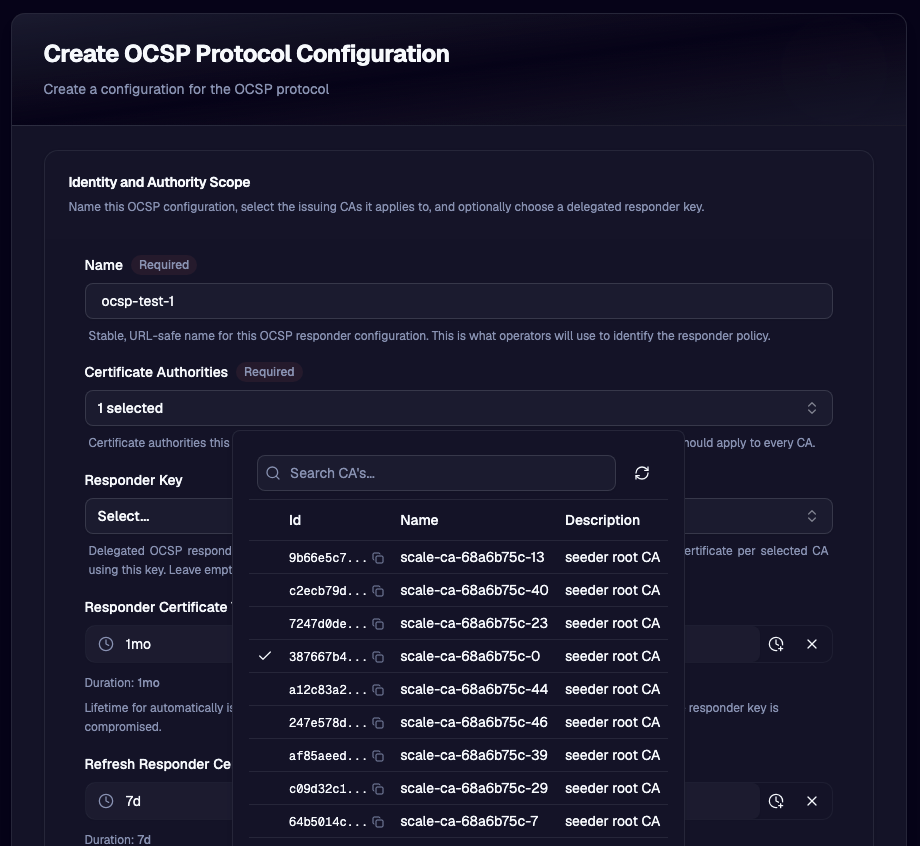
- Navigate to Protocols → OCSP in the left navigation bar.
- Click Create.
- Fill in the Identity and Authority Scope settings:
- Name — e.g.,
ocsp-test-1 - Certificate Authorities — select the appropriate issuing CA
- Responder Key — select the appropriate responder key
- Responder Certificate Validity — enter the desired time period validity of the OCSP Responder certificates that will be generated automatically off of the responder key. The default of
1 monthshould suffice. - Refresh Responder Certificate Before Expiry - enter the time period before the delegated responder certificate expires when the issuing certificate should renew this certificate. The default of
7 daysprovides ample time for an overlap, to ensure seamless operation and up-time.
- Name — e.g.,
Many of the default settings for the OCSP protocol configuration are adequate for a general and conformant OCSP Responder. The numerous advanced options available to the administrator correspond to optional capability and performance tweaks that are allowed by the RFCs. Many are special case parameters that support optional extensions/behavior such as lightweight mode. Please consult RFC 6960 and RFC 5019 for the implications and benefits of tweaking these parameters.
The final step for the creation of basic OCSP Responder is to ensure that the signing algorithm used by the responder matches the security strength and algorithm of the responder keypair. In this example, the CA tree uses all ECDSA keys, and the key for the delegated OCSP Responder was selected as ECCp256.
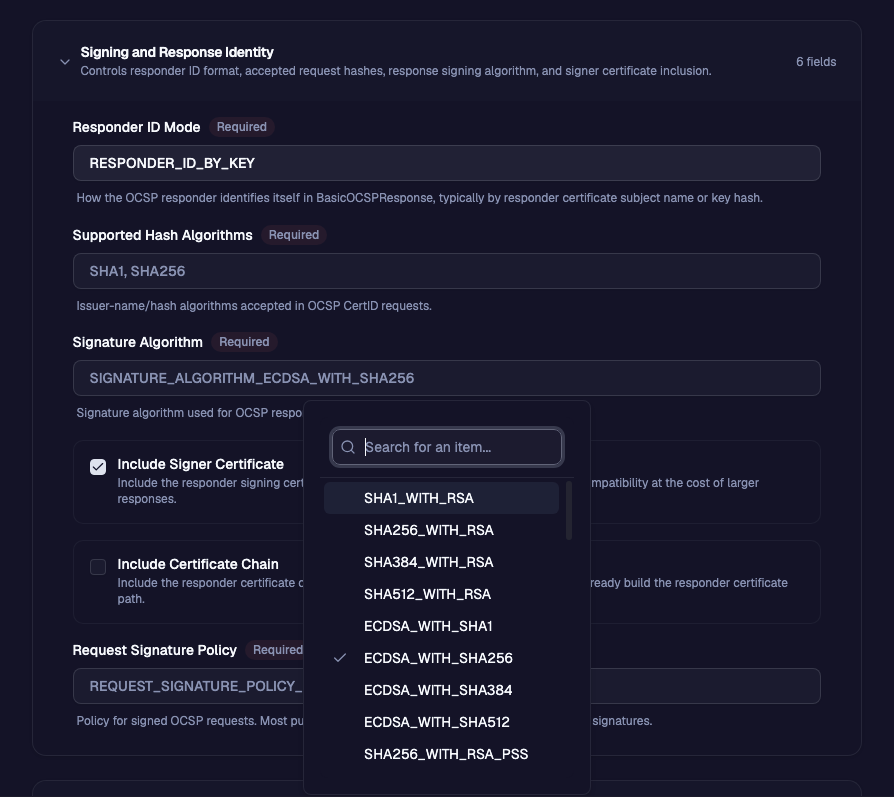
- Fill in the Signing and Response Identity settings:
- Responder ID Mode — Inside the BasicOCSPResponse structure, the responder can be configured to identify itself with its certificate subject name or its keyid. We can select the default of
RESPONDER_ID_BY_KEYto choose the latter. - Supported Hash Algorithms — This setting controls what hash types for certitifcate id's that the responser will accept in the OCSP requests. We can keep the standard defaults of SHA1 and SHA256 for this example.
- Signagure Algorithm — This field allows the administrator to configure the signature algorithm used for the OCSP responses. Since our delegated responder key that was created as a prerequisite is an ECCp256 keypair, we will select
SIGNATURE_ALGORITHM_ECDSA_WITH_SHA256. - Responder Certificate Validity — enter the desired time period validity of the OCSP Responder certificates that will be generated automatically off of the responder key. The default of `1
- Include Signer Certificate - ✅ Checked
- Include Certificate Chain - ☐ Unchecked
- Request Signature Policy - This configuration determines whether the OCSP Responder will require a signature on the OCSP requests. For this example, we will set the policy to
REQUEST_SIGNATURE_POLICY_IGNORE.
- Responder ID Mode — Inside the BasicOCSPResponse structure, the responder can be configured to identify itself with its certificate subject name or its keyid. We can select the default of
- Click the Create Configuration button.
Success! Your OCSP Responder has been deployed successfully. It's that easy! For this simple use-case, the repsonder is hosted directly by OT PKI and is accessible at https://<domain>/v1/ocsp/<config-name>. With our configuration from above, it would be https://example.localhost/v1/ocsp/ocsp-test-1
Step 2: Test the OCSP Responder with OpenSSL
For the purposes of this test, we will requires the DER-formatted Issuing CA and End-Entity certificates. We can confidentally assume that in a real-world scenario, an OCSP client would have access to each in order to create the OCSP Request binary. We can download the DER files directly from the user interface.
3a. End-Entity Certificate Download
- Navigate to Certificates in the left navigation bar.
- Using the table filtering, locate the desired End-Entity certificate.
- Click the row-level ellipsis icon for the desired certificate ...
- Navigate in the sub-menu to Download Certificate → DER format
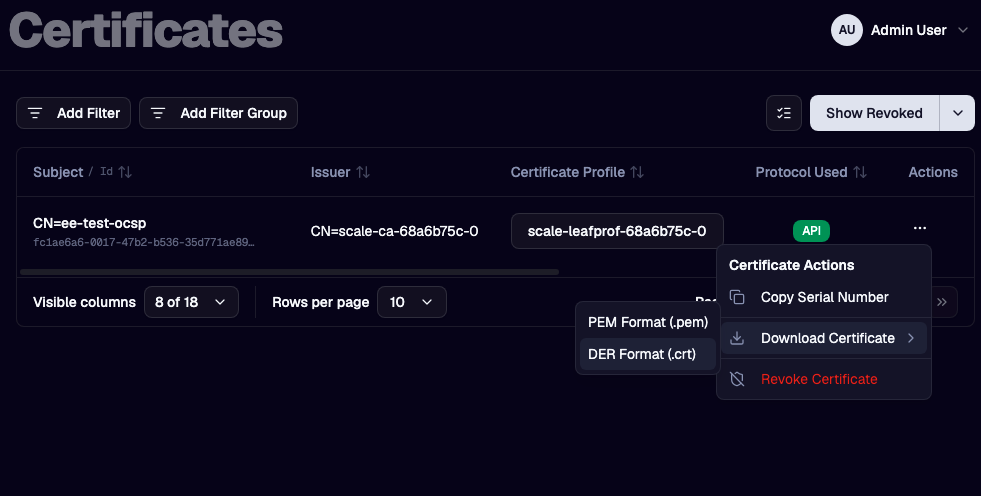
3b. Issuing CA Certificate Download
- Navigate to Certificate Authorities in the left navigation bar.
- Using the table filtering, locate the desired Certificate Authority.
- Click the row, thus expanding the CA details to the right side of the table.
- Navigate in the expanded view to CA Certificates
- Click the download icon (see arrow below)
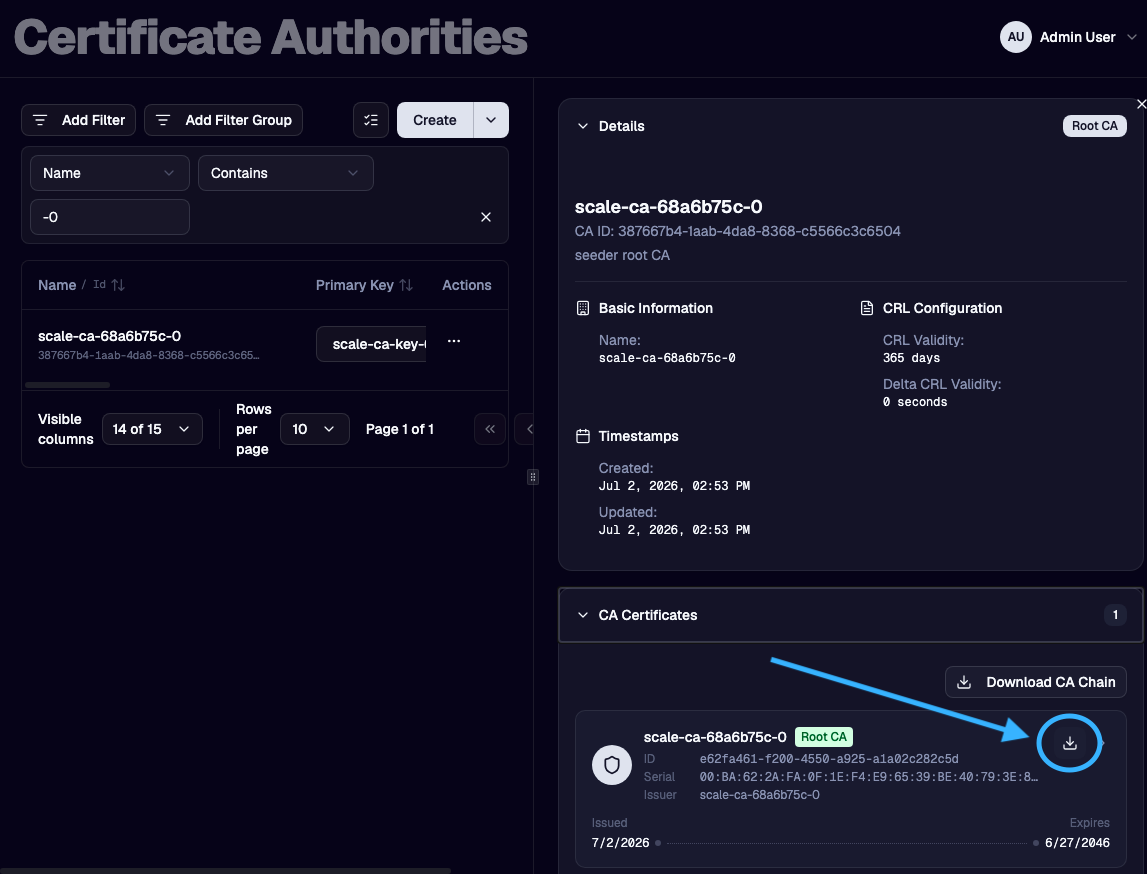
3c. Create an OCSP Request for the End-Entity Certificate
Let's assume that the issuer CA certificate is named issuerCert.der and the end-entity certificate is named cert.der. Run the following command in the directory where those files exist.
openssl ocsp -issuer ./issuerCert.der -cert ./cert.der -reqout ocsp_request.der -nonce
Now for completeness, we can use OpenSSL to view the contents of the OCSP Request.
openssl ocsp -reqin ocsp_request.der -text -noverify

OCSP Request Data:
    Version: 1 (0x0)
    Requestor List:
        Certificate ID:
          Hash Algorithm: sha1
          Issuer Name Hash: 019CDFCE3C7E81559790E614028C0BF10F30BCB5
          Issuer Key Hash: C7877F8A8310C49115E639100639551819A4CF7B
          Serial Number: 28C3997269D3082E155CD751691A8629
    Request Extensions:
        OCSP Nonce:
            04104A16710588DECCCBA402BEE01ADC6C41
3d. Use curl to get an OCSP Response
Next we will use curl to call the OCSP Responder at its default location (at the url of the OT PKI installation). Note that with advanced deployments, any number of geographically disparate Validation Services (VS) nodes can be deployed in order to support a highly scalable OCSP response system. In the default case, the OCSP responses are provided by a VS that is co-located with the Enrollment Services (ES).
curl -X POST --location --insecure "https://example.localhost/v1/ocsp/ocsp-test-1" --header 'Content-Type: application/ocsp-request' --data-binary '@ocsp_request.der' --output ocsp_response.der --write-out "\nHTTP Status: %{http_code}\n"

  % Total    % Received % Xferd  Average Speed   Time    Time     Time  Current
                                 Dload  Upload   Total   Spent    Left  Speed
100   912  100   792  100   120  10860   1645 --:--:-- --:--:-- --:--:-- 12493

HTTP Status: 200
3e. Inspect and Verify the Good OCSP Response
Now that we have requested an OCSP response from the responder, we can view the contents of the response and verify its validity.
openssl ocsp -respin ./ocsp_response.der -CAfile issuerCert.der -verify_other cert.der -resp_text

OCSP Response Data:
    OCSP Response Status: successful (0x0)
    Response Type: Basic OCSP Response
    Version: 1 (0x0)
    Responder Id: 0B18ACC8AC4C602B3963D2F5E41246DDE7D3A333
    Produced At: Jul  3 16:11:00 2026 GMT
    Responses:
    Certificate ID:
      Hash Algorithm: sha1
      Issuer Name Hash: 019CDFCE3C7E81559790E614028C0BF10F30BCB5
      Issuer Key Hash: C7877F8A8310C49115E639100639551819A4CF7B
      Serial Number: 28C3997269D3082E155CD751691A8629
    Cert Status: good
    This Update: Jul  3 16:06:00 2026 GMT
    Next Update: Jul  7 16:16:05 2026 GMT

    Response Extensions:
        OCSP Nonce:
            04104A16710588DECCCBA402BEE01ADC6C41
    Signature Algorithm: ecdsa-with-SHA256
    Signature Value:
        30:45:02:21:00:c9:e1:4c:86:97:62:05:1b:31:6c:c3:4d:99:
        d1:0b:19:1f:c3:62:df:38:84:9e:3a:eb:06:bf:8a:cd:1e:da:
        15:02:20:5f:31:44:9a:34:b2:e3:1e:58:33:4b:b2:4e:bf:fb:
        32:9d:ae:a1:21:9e:bb:16:8e:60:64:eb:28:e0:2e:f2:79
Certificate:
    Data:
        Version: 3 (0x2)
        Serial Number:
            36:43:72:aa:d0:96:95:6a:ee:5e:2e:7f:aa:2b:cf:52:65:b5:f5:66
        Signature Algorithm: ecdsa-with-SHA256
        Issuer: CN=Issuer-CA-0, O=Test
        Validity
            Not Before: Jul  3 15:42:27 2026 GMT
            Not After : Aug  2 15:47:27 2026 GMT
        Subject: CN=OCSP Responder for Issuer-CA-0
        Subject Public Key Info:
            Public Key Algorithm: id-ecPublicKey
                Public-Key: (256 bit)
                pub:
                    04:c5:92:8e:ed:1d:a6:07:a1:91:30:d9:9b:ab:ce:
                    3a:06:79:5a:51:47:bf:70:b2:ea:3d:b2:0a:cf:14:
                    3f:9b:89:1f:3c:4e:c8:e9:03:19:3c:05:8e:87:d2:
                    27:a2:9d:55:c7:56:af:3f:87:38:77:c7:e8:22:65:
                    4f:5d:06:d8:8d
                ASN1 OID: prime256v1
                NIST CURVE: P-256
        X509v3 extensions:
            X509v3 Key Usage: critical
                Digital Signature
            X509v3 Extended Key Usage:
                OCSP Signing
            X509v3 Basic Constraints: critical
                CA:FALSE
            X509v3 Authority Key Identifier:
                F5:97:2A:67:72:D9:B1:7F:34:EA:81:32:C6:F4:28:41:2E:AF:1F:97
            OCSP No Check:

    Signature Algorithm: ecdsa-with-SHA256
    Signature Value:
        30:46:02:21:00:e1:8c:46:3d:b7:00:da:72:97:19:6b:86:cd:
        0c:e4:a4:68:76:1e:5b:62:9e:c6:ab:ee:cc:5a:78:38:33:ac:
        ae:02:21:00:83:61:eb:45:6f:a4:cf:2c:a2:c0:89:aa:1b:98:
        db:f5:7a:5e:61:6b:75:99:62:ad:94:3a:73:89:66:8b:ea:a5

Response verify OK
We should note a few interesting items about the above response.
- Most importantly, the certificate status is Good (
Cert Status: good) - The Responder ID has been returned as the key identifier, i.e.
Responder Id: 0B18ACC8AC4C602B3963D2F5E41246DDE7D3A333 - The OCSP Responder certificate (auto-generated) has been returned in the response
- This responder certificate is RFC5280 compliant, with the proper
OCSP SigningEKU andOCSP No Checkextensions. - Finally, the signature over the response was verified (i.e.
Response verify OK)
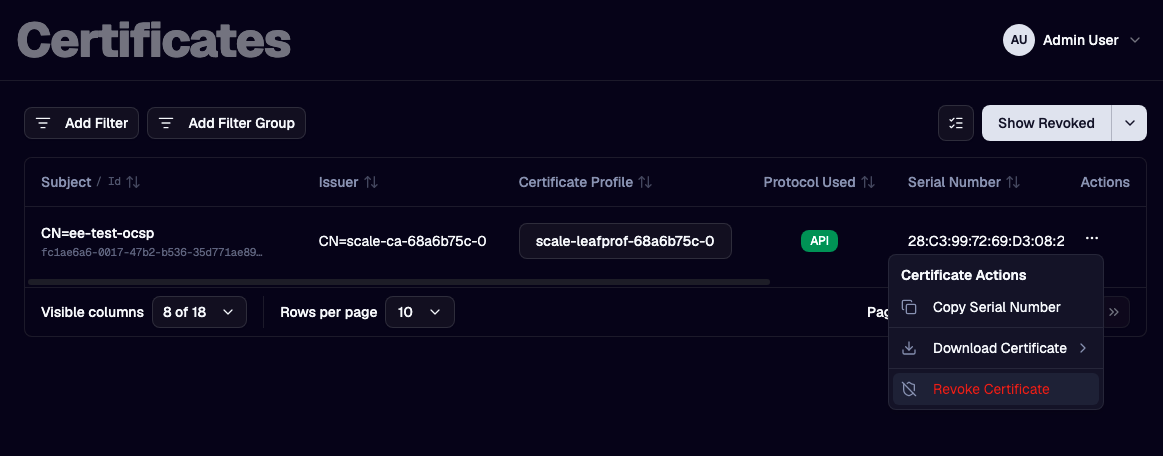
3f. Revoke the End-Entity Certificate
- Navigate to Certificates in the left navigation bar.
- Using the table filtering, locate the desired End-Entity certificate.
- Click the row-level ellipsis icon for the desired certificate ...
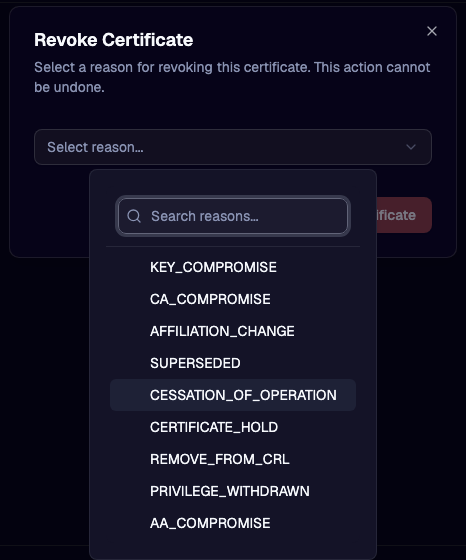
- Navigate in the sub-menu to Revoke Certificate
- Select the desired Revocation Reason
3g. Use curl to get an updated OCSP Response
Create a new OCSP request with OpenSSL and note the different nonce value.
openssl ocsp -issuer ./issuerCert.der -cert ./cert.der -reqout ocsp_request.der -nonce

openssl ocsp -reqin ocsp_request.der -text -noverify
OCSP Request Data:
    Version: 1 (0x0)
    Requestor List:
        Certificate ID:
          Hash Algorithm: sha1
          Issuer Name Hash: 019CDFCE3C7E81559790E614028C0BF10F30BCB5
          Issuer Key Hash: C7877F8A8310C49115E639100639551819A4CF7B
          Serial Number: 28C3997269D3082E155CD751691A8629
    Request Extensions:
        OCSP Nonce:
            0410EF0AD7B19DAA40B43D21FCF4C55AB6AB
Now send the following curl command to get a new response.
curl -X POST --location --insecure "https://example.localhost/v1/ocsp/ocsp-test-1" --header 'Content-Type: application/ocsp-request' --data-binary '@ocsp_request.der' --output ocsp_response.der --write-out "\nHTTP Status: %{http_code}\n"
3h. Inspect and Verify the Revoked OCSP Response
Now that we have requested an OCSP response from the responder, we can view the contents of the response and verify its validity, as well as confirm that the status of the certificate is properly stated as revoked along with the reason that we chose above.
openssl ocsp -respin ./ocsp_response.der -CAfile issuerCert.der -verify_other cert.der -resp_text

OCSP Response Data:
    OCSP Response Status: successful (0x0)
    Response Type: Basic OCSP Response
    Version: 1 (0x0)
    Responder Id: 0B18ACC8AC4C602B3963D2F5E41246DDE7D3A333
    Produced At: Jul  6 14:53:00 2026 GMT
    Responses:
    Certificate ID:
      Hash Algorithm: sha1
      Issuer Name Hash: 019CDFCE3C7E81559790E614028C0BF10F30BCB5
      Issuer Key Hash: C7877F8A8310C49115E639100639551819A4CF7B
      Serial Number: 28C3997269D3082E155CD751691A8629
    Cert Status: revoked
    Revocation Time: Jul  4 21:05:06 2026 GMT
    Revocation Reason: cessationOfOperation (0x5)
    This Update: Jul  6 14:48:00 2026 GMT
    Next Update: Jul 10 14:58:05 2026 GMT

    Response Extensions:
        OCSP Nonce:
            0410EF0AD7B19DAA40B43D21FCF4C55AB6AB
...

Response verify OK
Next Steps
- OCSP Options — full description of every OCSP setting.